Overview
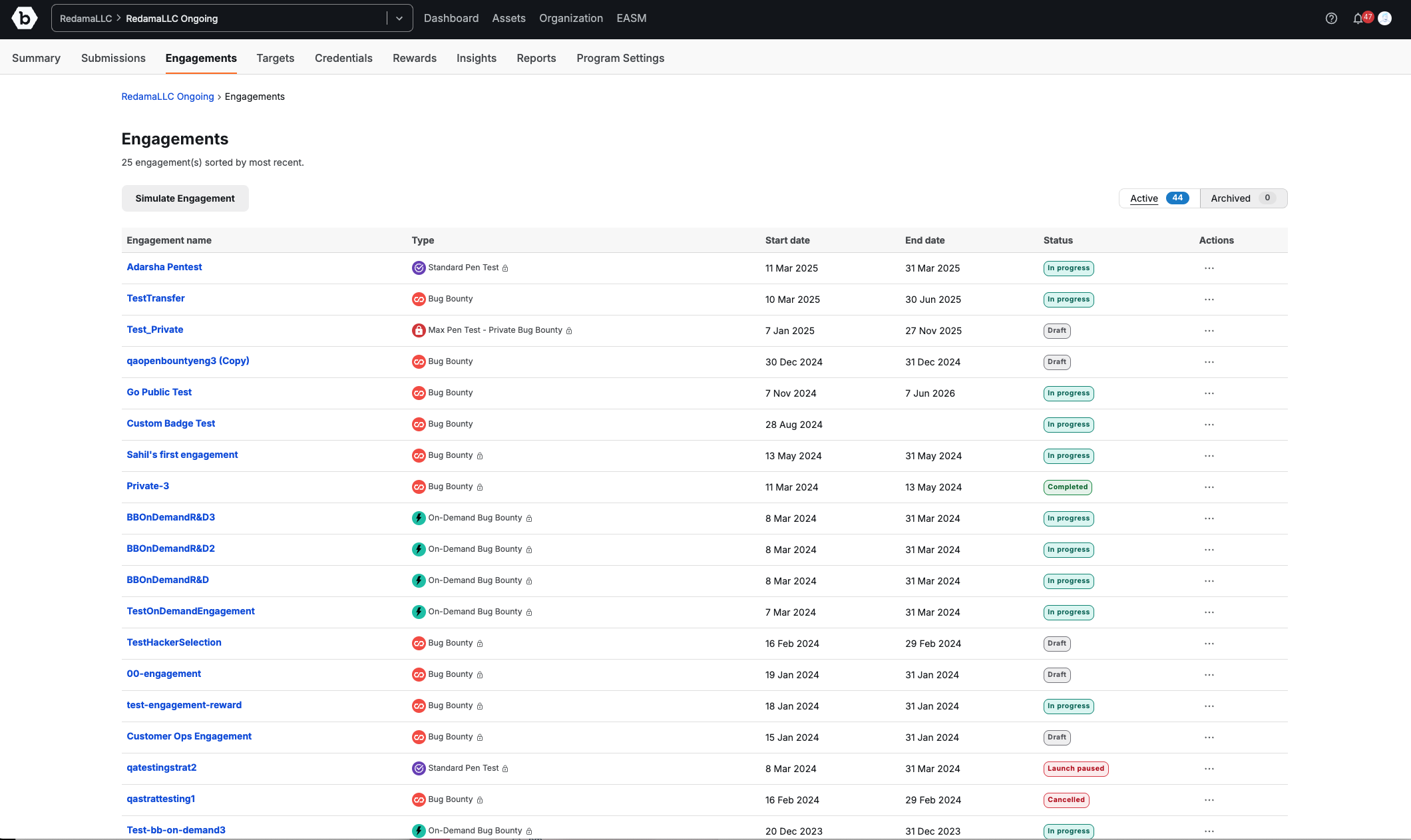
The Engagements page provides a centralized view of all security testing engagements within your program. It enables you to quickly find, manage, and monitor the progress of active and archived engagements.
This page replaces the engagement list previously found under the Summary page and consolidates engagement-related tools and controls into one location.
From the Program navigation, click Engagements to access this page (Program > Engagements).
Key Features
The main table lists all engagements for your program, showing:
- Engagement name: The name of the engagement. Clicking the name opens the engagement’s Overview page.
- Type: Indicates the type of engagement (e.g. Bug Bounty, On-Demand Bug Bounty, Standard Pen Test).
- Start date: The date the engagement begins.
- End date: The scheduled end date for the engagement.
- Status: Displays the current engagement status (e.g., In progress, Draft, Completed, Cancelled, Launch paused).
- Actions: A menu (…) with options for managing the engagement (e.g. View submissions, Settings, Archive).
Views
Located at the top right of the table: