- Security & Data Assurance
- Machine Learning vs. Generative AI Models
- Global Control of LLMs
- How to Enable or Disable the Feature
- FAQ
Bugcrowd is committed to providing powerful, secure Generative AI (GenAI) capabilities for your security program. This document details our use of Large Language Models (LLMs) and how Organization Owners can control their use across the Organization. Enabling these features available for customer use signifies consent for GenAI/LLM service use.
Security & Data Assurance
The current features controlled by the Global Control of LLMs are:
| Feature Name | Documentation |
|---|---|
| Ask AI (The Natural Language Query function of AI Analytics) | Learn more |
| AI Triage Assistant | Learn more |
Features NOT controlled by the Global Control
- AI Connect: This feature is NOT controlled because the MCP Server is not an LLM and does not use Bugcrowd’s LLM infrastructure.
- Analytics (Dashboards): The core Analytics (Dashboards) section will always remain accessible, as it does NOT utilize LLMs. Within AI Analytics, only the Ask AI (natural language query) feature is governed by the Global Control.
Machine Learning vs. Generative AI Models
There is a distinction regarding which models are impacted by this control:
- Generative AI (GenAI) / Features that Use LLMs: AI features that utilize LLMs to help with user productivity fall under this category. These features are controlled by the Global Control of LLMs.
- Machine Learning (ML): Core Bugcrowd models (e.g., CrowdMatch) used for prediction/matching. These models are ML classifiers, do not use LLMs, and are NOT affected by the Global Control.
Global Control of LLMs
The Global Control allows Organization Owners to Enable or Disable all features available for your use that use LLMs with a single action. Setting the control to Disabled deactivates all these current and future LLM-powered features. Organization Owners can Enable or Disable this control at any time.
Control Access
Only Organization Owners have the permissions to manage this Global Control.
However, certain features, such as the AI Triage Assistant, also offer the option to be managed at the Program level.
- If the Global Control is Disabled, all LLM-related features - even those with Program-level access - will be disabled and cannot be enabled at the Program level.
- If the Global Control is Enabled, Program-level features can be subsequently disabled by roles with Program-level access (e.g., Program Owners) on Program > Settings > Integrations.
- Features accessible only by Organization Owners are controlled exclusively by the Global Control.
How to Enable or Disable the Feature
-
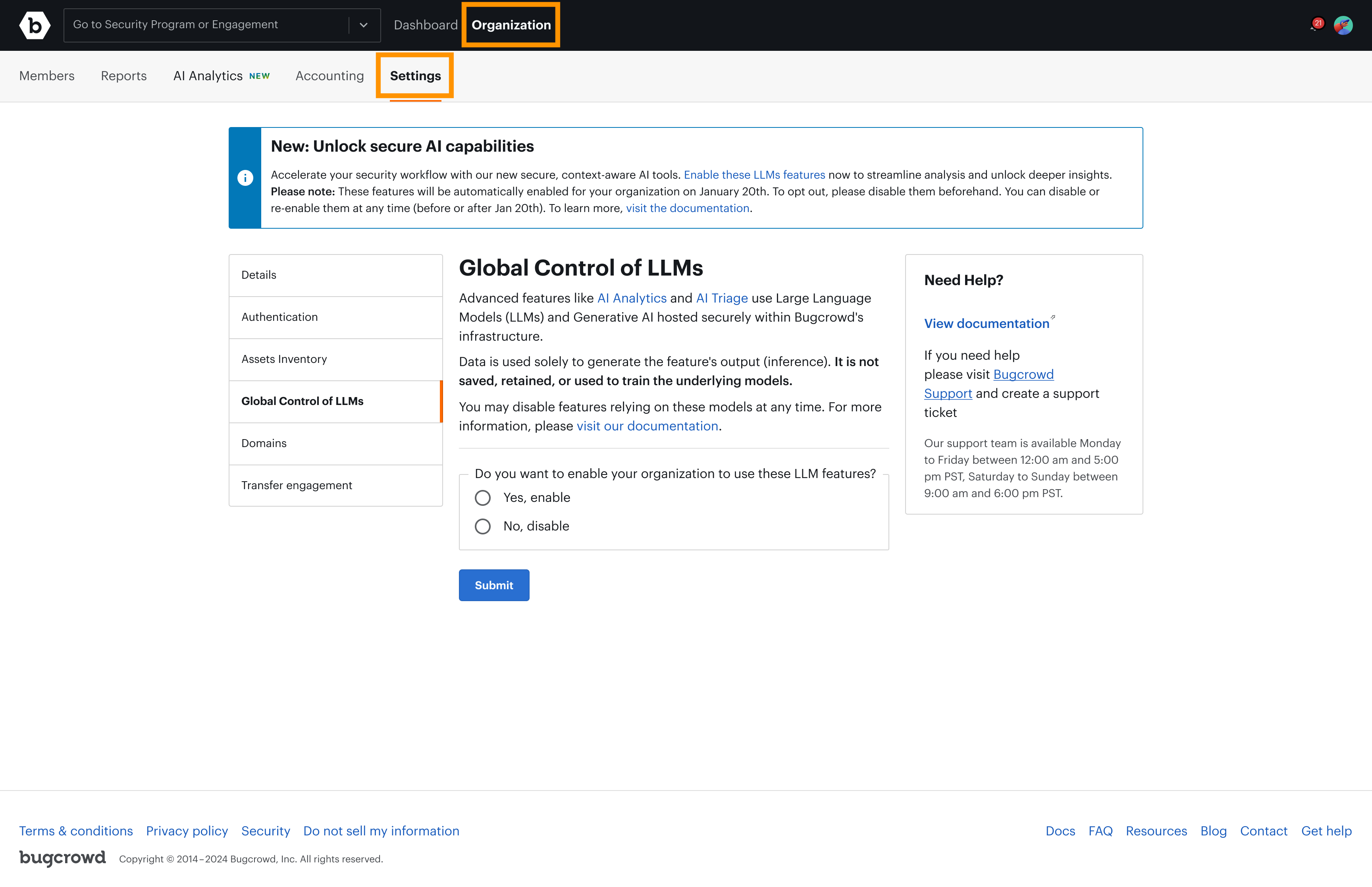
Navigate to Organization in the main menu, and go to the Settings tab.
-
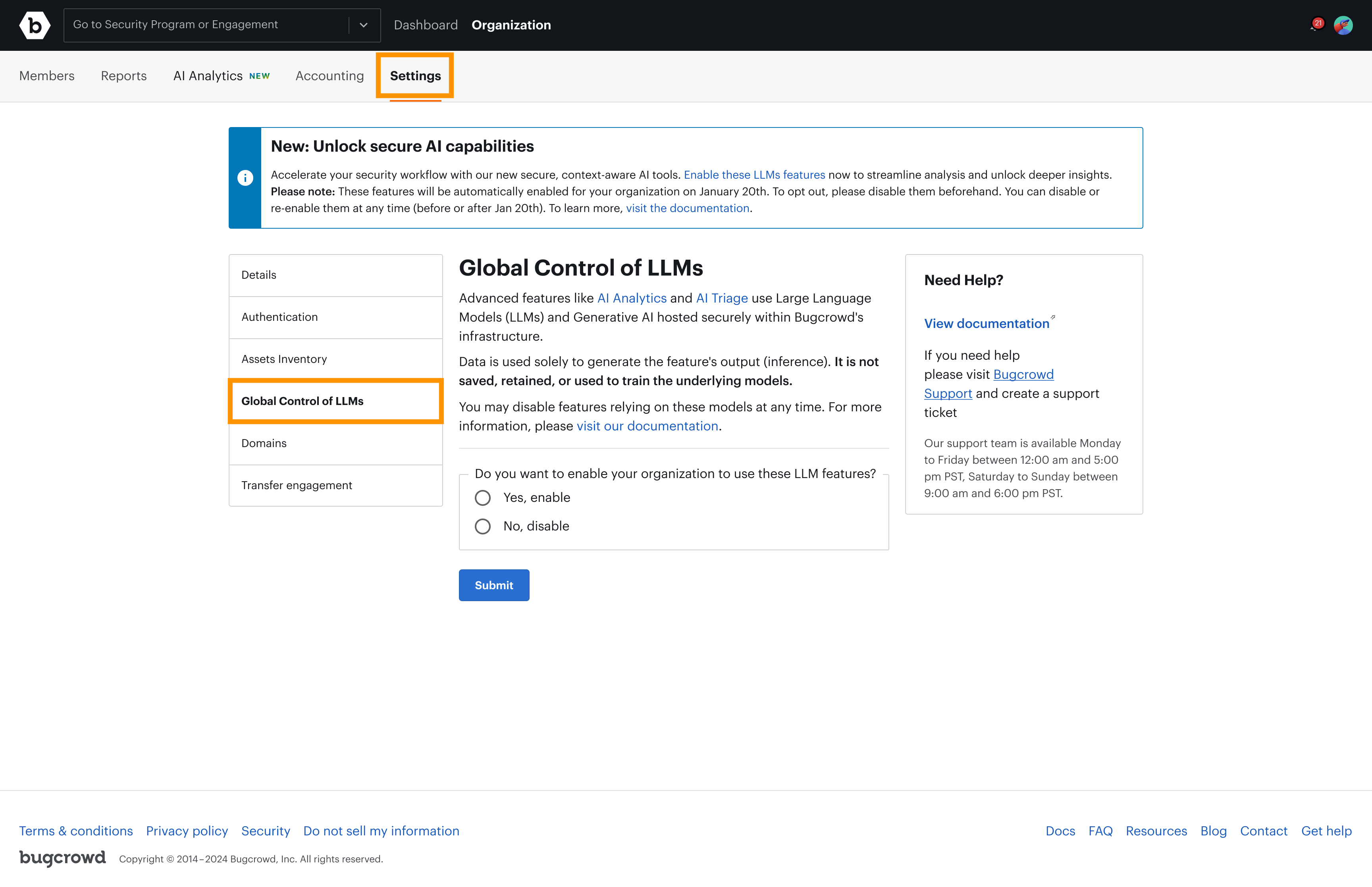
Select the Global Control of LLMs section.
-
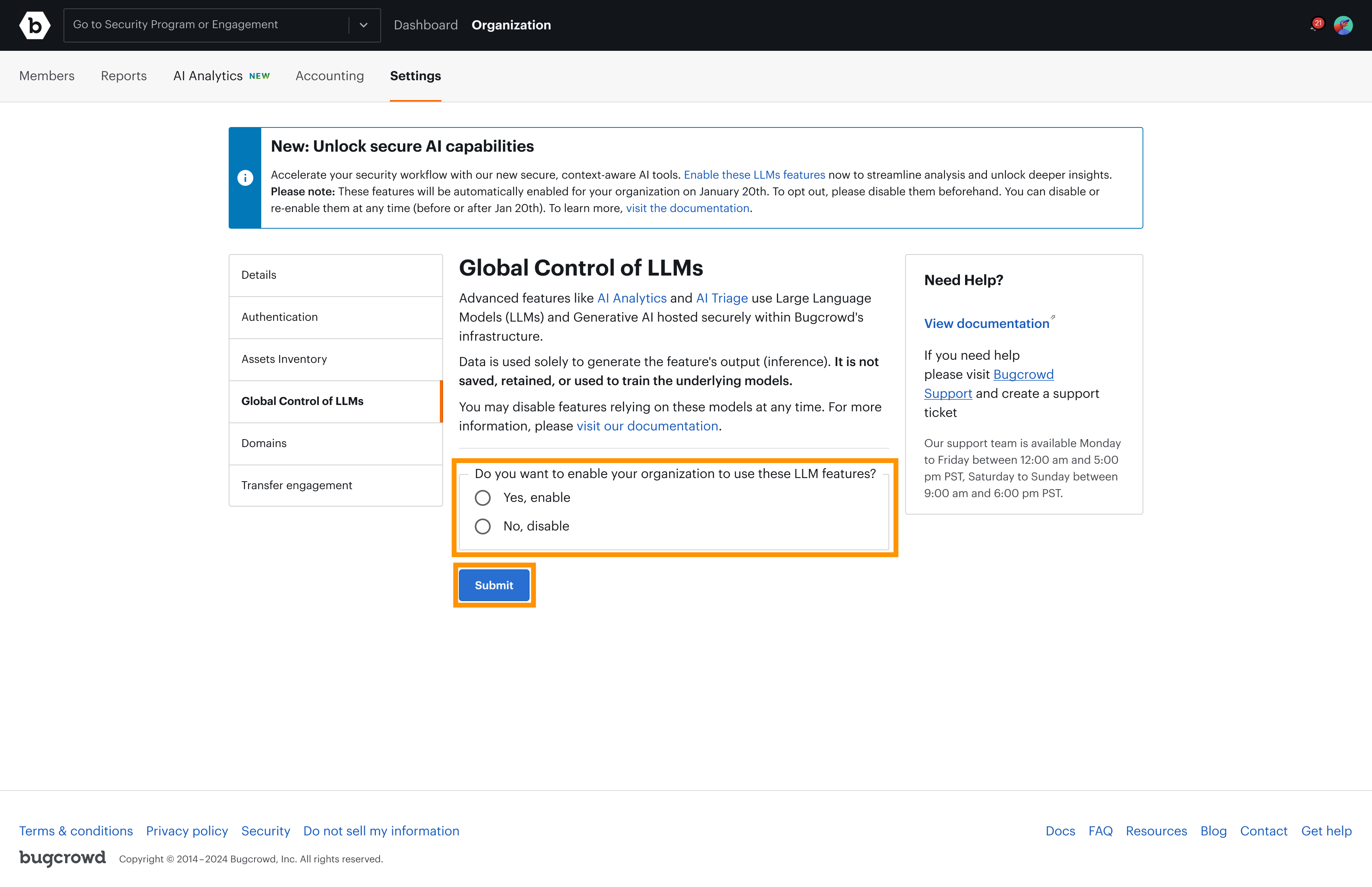
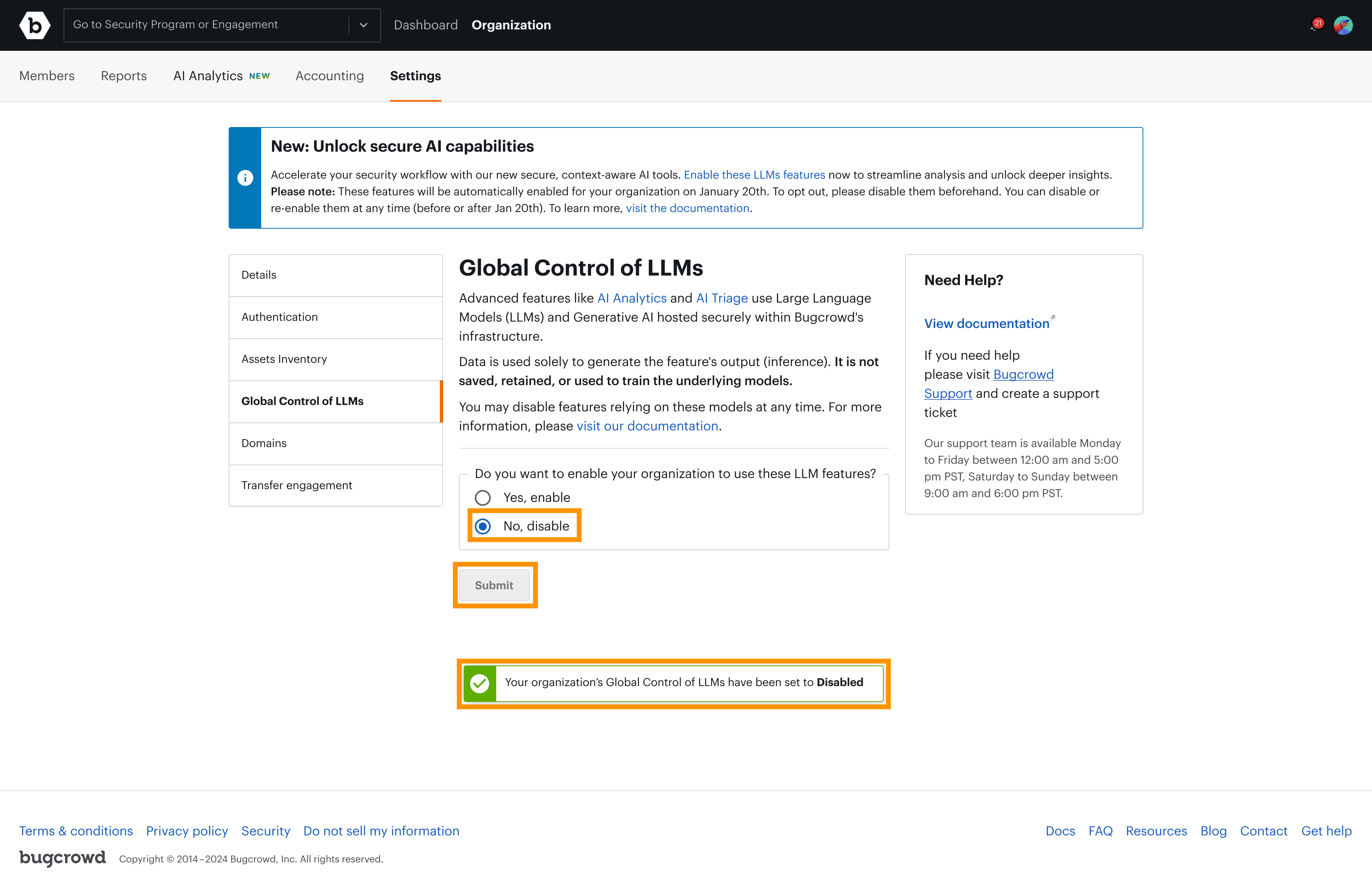
Toggle the control to Enable or Disable. Click Submit to save your changes and wait for the confirmation message.
-
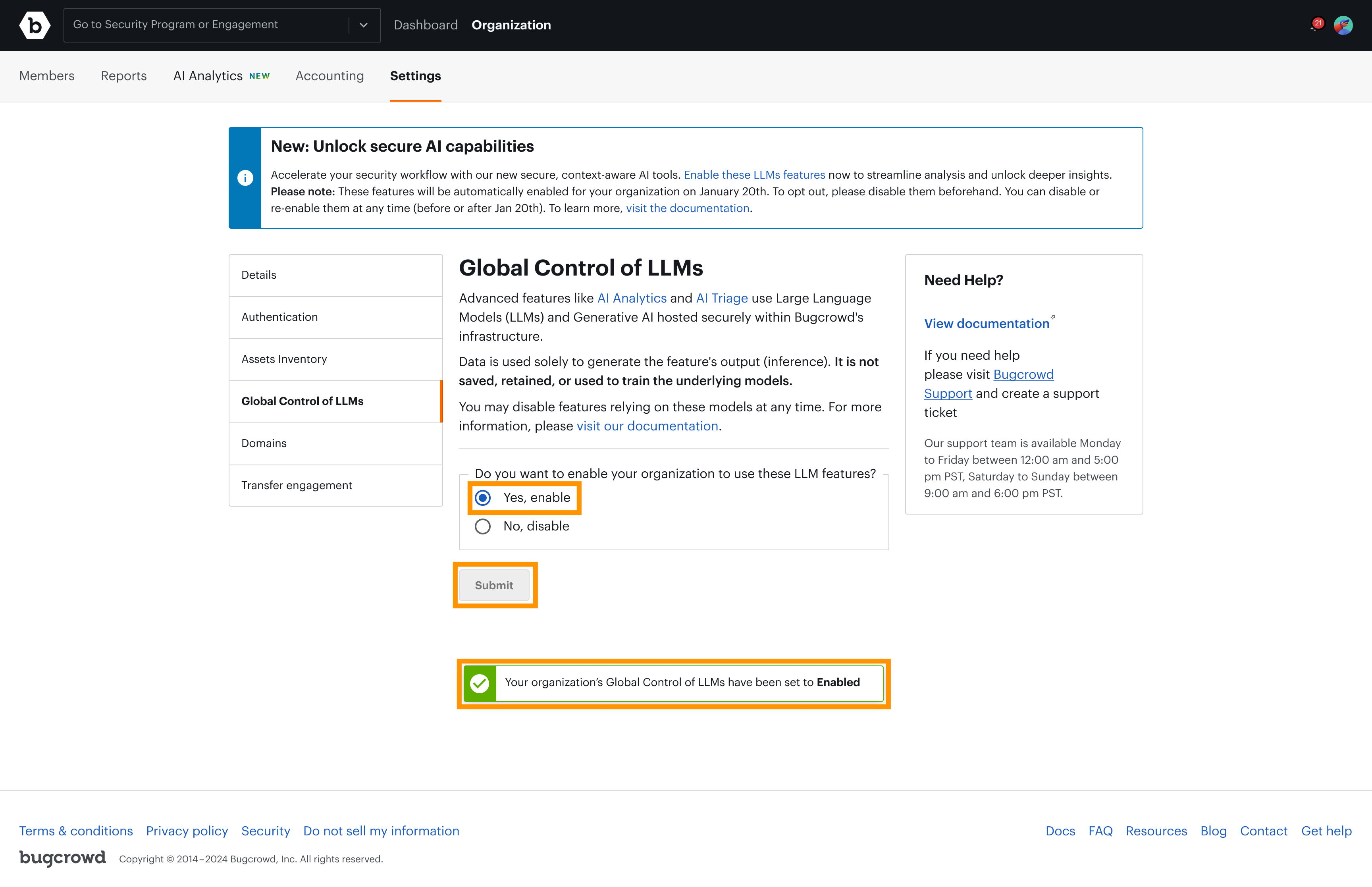
If Enable + Submit was selected, you will see the following confirmation page and the access to the current LLM-connected features will be enabled.
-
If Disable + Submit was selected, you will see the following confirmation page and all LLM-connected features across your Organization will be disabled.
Notes
- Customers can Enable or Disable the feature at any time.
- Customers with AI Provisions will have the control disabled by default and can enable it back if desired.
FAQ
What features are included in the AI Capabilities?
Currently, AI Triage Assistant and AI Analytics.
Does the Global Control affect AI Connect (MCP Server)?
No. AI Connect is NOT controlled because the MCP Server is not an LLM and, therefore, does not use Bugcrowd’s LLM infrastructure.
Why is AI Analytics accessed even if the Global Control of LLMs is Disabled or in ‘null’ state?
The AI Analytics feature has two components:
- Dashboards: The initial view, called Analytics (e.g., Submissions, Performance), is a series of standard dashboards that do not use LLMs. This is why this page remains accessible when the Global Control is Disabled or null. For more info, visit the AI Analytics documentation.
- Ask AI: The Ask AI feature (accessed via the ‘Ask AI’ button on the top right) does use LLMs. This component requires the Global Control of LLMs to be Enabled to be accessible.
Can Program Admins enable the Global Control of LLMs?
No. If the Global Control of LLMs is Disabled, no features that use LLMs can be activated, nor even at the Program-level. Only Organization Owners can enable the Global Control.
How do I disable the GenAI features?
Even if you do not wish to use the GenAI features, it is requested to Disable the control in the platform (found at Organization > Settings > Global Control of LLMs).
Can new customers use the Global Control?
Yes. New customers have the feature enabled by default upon onboarding, unless their contract includes AI Provisions. Please note that any Organization Owner (current or new customer) can Disable and Re-enable the feature in-platform at any time.
Are there exceptions for customers with AI Provisions?
Yes. Customers with AI Provisions will have the control disabled by default.
Does the Global Control affect Machine Learning (ML) models?
No. Core models (e.g., CrowdMatch) are used for prediction/matching. These models are ML classifiers, do not use LLMs, and are NOT affected by the Global Control.